
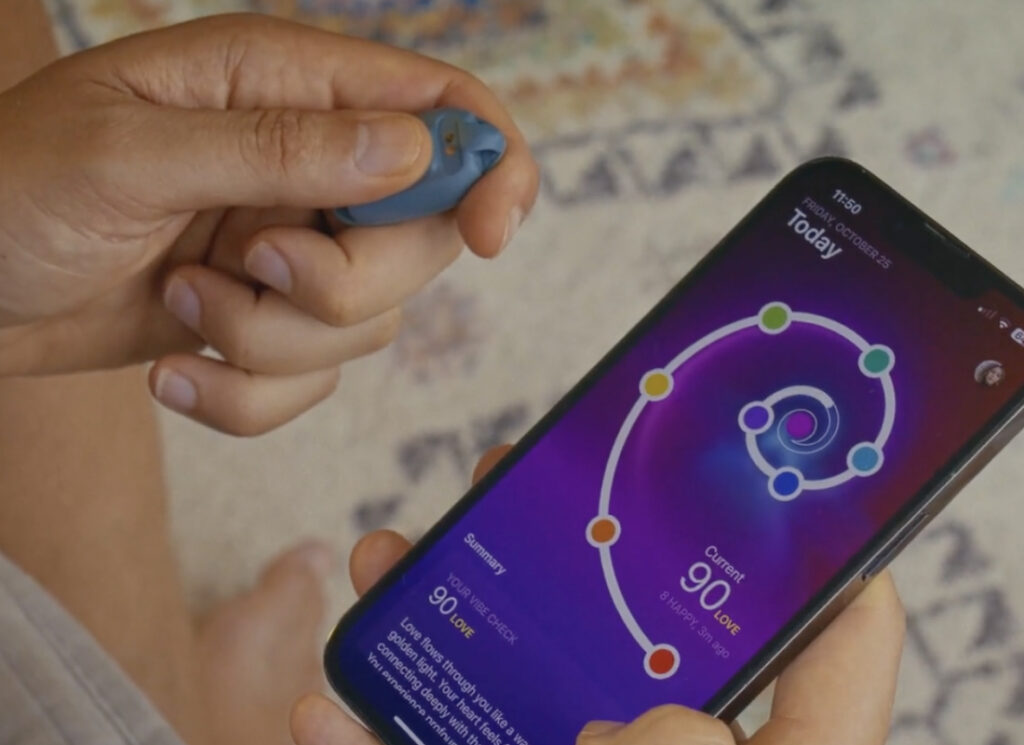
Vibetracker User Guide
Tune in, Track your Vibe,
Live with Intention
Setup • Daily Use • Care • Troubleshooting • FAQ
Guide Contents
Copyright & Legal
Video Guides
Unbox & Pair (4 min)
First Vibe Check & App Tour (6 min)
Charging & Care (1 min)
Common Fixes
Coming soon whenever we understand what are the most frequently asked questions.
1) Introduction & User Guidelines
What is VibeTracker? A wearable + app to help you check in with yourself, build awareness through short Vibe Checks, and reflect on patterns via the Reflection Index. Designed for mindfulness and self-reflection—not to diagnose, treat, or prevent any medical condition.
- What’s in the box
- VibeTracker Spiral wearable with [band/clasp]
- Magnetic USB charging cable
- Quick start card
- Safety & warranty leaflet
Intended use
- Daily mindfulness check-ins, journaling prompts, light habit tracking.
- Not a medical device; do not use for health diagnostics or emergencies.
2) Recommendations for Use
- When: on waking, before key moments, after workouts, before bed.
- How often: 3–5 short Vibe Checks per day prevents notification fatigue.
- Best practice: add a 10–20s note after each check—small reflections compound.
- Boundaries: use Focus Mode and Quiet Hours during deep work/sleep.
Disclaimer: Individual experiences vary. VibeTracker offers reflection—not medical advice.
3) Product Features
- One-tap Vibe Check — in the app.
- Interval Vibe Checks — smart nudges within your chosen window.
- Reflection Index — trend visualization over days/weeks.
- Journaling Nudges — micro-prompts after each check.
- Modes — Bracelet, Necklace (sensors disabled).
- LEDs — discrete feedback for status.
- Battery — typical up to 2 weeks per charge.
- Water resistance — basic splash resistance only. Do not submerge your Spiral!
- Privacy control — local caching + end-to-end encrypted sync.
4) Specifications
| Connectivity | Bluetooth® Low Energy |
| Sensors | Coming soon. |
| Battery | [mAh], charge time ~90 min |
| Charger | Magnetic pogo dock to USB-A (5V ⎓ 1A) |
| Dimensions/Weight | Coming soon. |
| Materials | Coming soon. |
| App | iOS, Android |
| Languages | English (other languages coming soon) |
5) Compatibility
- Supported: iPhone; Android with Google Play Services.
- Not supported: tablets without BLE, desktop OS.
6) Setup & Pairing
Before you start
- Charge to 100% (LED breathing = charging; solid = full).
- Install VibeTracker from App Store / Google Play.
- Enable Bluetooth and allow required permissions.
Pair your device (first time)
- Open app → Get Started → create or sign in.
- After logging in you will be guided through setup. Keep Spiral within 10 cm.
- Complete a first vibe check to ensure everything is working.
Wear & fit
- Wear above wrist bone; snug but comfy (one-finger gap).
- Sensor side against skin.
Tip: If pairing fails, see Problems & Solutions.
7) Daily Use
Start a Vibe Check (2 ways)
- In-app: tap Vibe Check (middle icon).
- Scheduled: enable Interval Vibe Checks.
Rate & reflect
- Choose your vibe on the slider.
- Add a quick tag (e.g., work, relationship, health).
- (Optional) write a 1–2 sentence note.
- Save to update your Reflection Index.
Reflection Index (how it works)
A rolling trend based on recent check-ins, consistency, and stability. Use it to spot patterns, not to judge yourself.
8) Charging & Care
- Charge when you see a low-battery banner.
- Align pins on magnetic dock; avoid fast chargers > 5V ⎓ 1A.
- Wipe with damp, lint-free cloth; avoid solvents/abrasives.
- Rinse band after workouts; dry before wearing.
- Avoid saunas/hot tubs.
9) Firmware Updates (coming soon)
- Updates install via app when battery > 40% and on the charger.
- Keep app open until completion (≈1–5 min).
- Find notes in Profile → Device → Firmware.
10) Privacy & Data
- You own your data. We never sell personal check-in data.
- Sync is end-to-end encrypted between device and servers.
- See full Privacy Policy & Terms.
11) Common Problems & Solutions
Toggle Bluetooth off/on, reboot phone, retry in-app.
Charge > 20% and move away from other BLE devices.
Allow notifications; add app to OS Focus exceptions.
Ensure only one phone is connected; stay within 1 m; avoid metal surfaces.
Reduce interval frequency; update firmware and app.
Clean band/wrist; rotate wrists; stop use if irritation persists.
OK for sweat/light rain. If submerged: power off, dry 24h. Do not charge while wet.
12) Warranty & Returns
- Limited warranty: 12 months for defects under normal use.
- Exclusions: wear & tear, bands, accidental damage, liquid ingress beyond rating, unauthorized repairs.
- How to claim: contact support with proof of purchase, issue description.
- Returns: See this page.
13) Safety & Compliance
- Not a medical device; not a substitute for professional care.
- If you have a pacemaker/implant, consult your physician before use.
- Keep away from small children—contains small parts and magnets.
- Operating temp: 0–35°C; storage: –10–45°C.
- Dispose/recycle per local e-waste rules.
- Certifications: CE, UKCA, FCC ID, RoHS.
14) Customer Support
Email: hello@vibetracker.com
VibeTracker Inc.
Registered address: Bergseweg 24, 4921 PS Made, Netherlands
Chamber of Commerce (KVK): 91237742
VAT ID: NL 865590837 B01
15) Delete your account
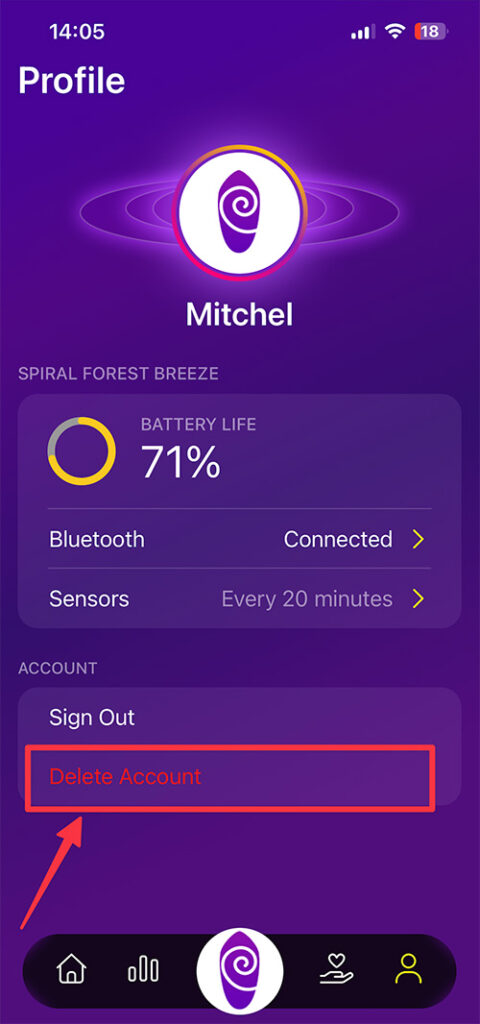
You can permanently delete your VibeTracker account from within the app.
- Open the app and go to Profile.
- Tap Account.
- Select Delete Account.
- Confirm by pressing Delete.
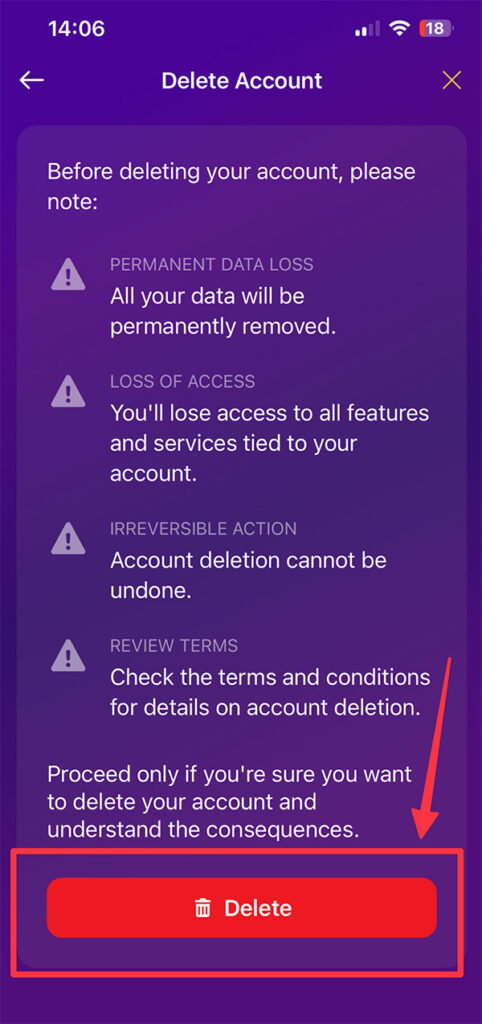
Heads up: Deleting your account is permanent and removes your profile and associated data from our systems.
Profile → Account → Delete Account → Delete
If you run into issues, contact support and we’ll help you complete the deletion.
16) Appendices
Appendix A — LED Patterns
| Event | LED |
|---|---|
| Power on | Blinking purple |
| Pairing | Long purple |
| Connected | Blinking purple |
| Charging | Blinking red |
| Fully charged | Solid purple |
Appendix B — Permissions Explained
- Bluetooth: connect to the wearable.
- Notifications: deliver scheduled nudges.
- Motion/Fitness: improve gesture reliability (optional).
Appendix C — Quick Start Card (printable)
- Charge to 100%
- Install app → create account
- Pair in app
- Do your first Vibe Check
- Enable Interval Vibe Checks
- Review Reflection Index after day 3
Appendix E — Replacement Parts
- Coming soon.
Last updated: 2 Oct 2025